

What Is an Industrial Borescope (Endoscope) & How Does It Work?
Industrial borescopes — also referred to as industrial endoscopes or inspection cameras — are specialized imaging tools built to access hidden spaces unreachable by the naked eye. They operate on similar core principles to sewer endoscopes widely used for drain line diagnostics. Unlike medical endoscopes designed for human body examinations, industrial borescopes are engineered to withstand harsh factory and field conditions, outfitted with durable insertion tubes, waterproof probe heads, and fully adjustable lighting systems.
Core Working Principle of Industrial Endoscopes
1. Feed the flexible, articulating probe tube into tight spaces such as engine cavities, metal piping, and clogged drain lines.
2. Built-in LED lights at the probe tip illuminate dark interior surfaces for clear visibility.
3. A compact high-resolution camera streams live footage directly to the unit’s handheld touchscreen monitor.
4. Operators use a joystick to adjust the probe’s bending direction and angle to inspect every surface and hard-to-reach corner.
5. Capture photos or record video footage to document flaws like cracks, corrosion, and blockages for formal inspection reports.
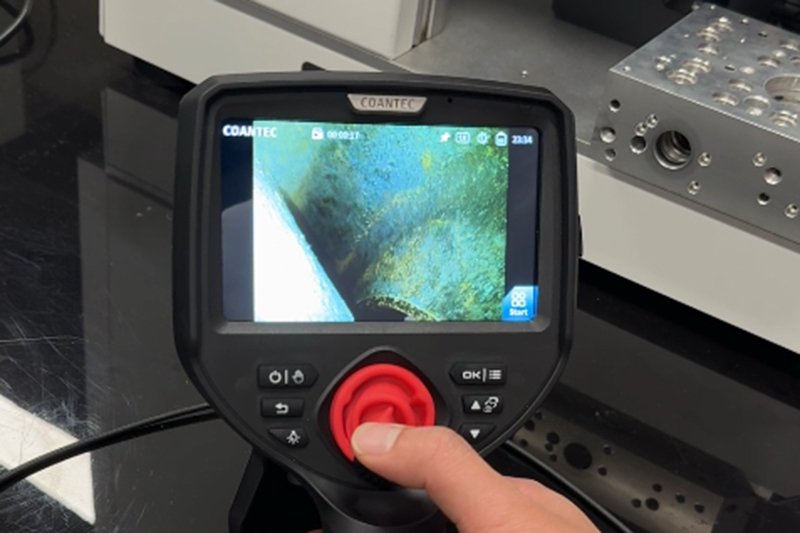
COANTEC M40 Borescope – Product Overview & Key Upgrades Over the C40 Model
The M40 Series is a fully upgraded successor to the popular C40 industrial borescope, engineered to deliver faster inspection workflows and superior compatibility with complex internal component layouts.
Standout Hardware Advantages
- Larger industrial-grade HD touchscreen for crisp, detailed live previews
- Modular, interchangeable insertion tube system to accommodate diverse inspection scenarios
- Joystick-controlled articulating probe with a locking brake knob to hold fixed positioning
- 0–9 adjustable LED brightness levels to achieve balanced lighting in any environment
- Dual rechargeable lithium-ion batteries paired with Type-C fast charging
- Included 8GB TF card for onboard storage of images, video footage, and inspection reports
- HDMI video output to mirror live feeds onto external large-format displays
- Wi-Fi wireless connectivity for remote live viewing and seamless file transfers
Built-In Digital Image & Editing Functions
- Full image quality tuning: brightness, contrast, hue, saturation, sharpness, gamma correction, plus one-click factory default reset
- 90° clockwise image rotation, horizontal mirror flip, and three color modes (original color, black-and-white, negative)
- Live frame freeze feature, split-screen side-by-side comparison of live footage and saved reference images
- 1x–5x digital zoom, on-screen annotation tools, and multiple measurement ruler options
- Customizable watermark settings to standardize industrial inspection documentation
Step-by-Step Operation Guide for the COANTEC M40 Industrial Borescope
Pre-Operation Preparation & Power On
1. Open the protective carrying case and remove the main unit, insertion tube, and battery pack. Take care to avoid impact damage to the delicate probe tip.
2. Insert the lithium battery into the handle compartment and securely snap the battery cover closed.
3. Align the joystick end of the insertion tube with the circular port on the rear of the main unit and push it fully into place. Twist the locking ring clockwise until you hear an audible click confirming a secure fit.
4. Press and hold the power button for three seconds to boot the system. Once initialization finishes, the unit loads the live inspection interface. Tap the “Start” button to pull up the full function menu.
Standard Inspection Workflow
1. Slowly feed the probe tube into the confined target area.
2. Use the central joystick to adjust the probe’s bending direction and angle. Rotate the brake knob under the joystick clockwise to lock the probe in place for steady, hands-free observation.
3. Adjust LED brightness either via the on-screen slider or physical +/- buttons to eliminate overexposure or dim, shadowed areas.
4. When defects are identified, tap the photo/video button to save visual evidence for official inspection records.
5. Before retracting the tube: turn the brake knob counterclockwise to release tension, center the joystick to straighten the probe tube, then slowly pull the tube back out.
Post-Use Shutdown & Storage
1. Fully straighten the probe tube and retract it from the inspected component, taking care not to bump the probe tip.
2. Hold the power button down to trigger automatic setting saves and system shutdown. Wait until the screen goes completely blank before storing the device.
3. Wipe dirt, oil, and residue off the probe lens using a lint-free cloth lightly dampened with isopropyl alcohol.
4. Neatly coil the insertion tube, place the main unit and all accessories back inside the protective carrying case, and fasten all latches tightly.
5. Remove the battery if the equipment will sit unused for an extended period.
Full System Settings & Advanced Functional Features
System Configuration Menu
1. Wi-Fi Setup: Toggle wireless connectivity on or off, scan for nearby networks, and enter passwords to enable remote live streaming.
2. User Management: Three tiered access modes (Administrator / Standard User / Guest; default admin password: 123456). Administrators can create, delete, and reset passwords for secondary users.
3. Device Info & Firmware Upgrades: View hardware serial details and install system updates via TF card.
4. Display Settings: Modify screen brightness, switch between multiple language options, and calibrate the internal date and time clock.
5. Custom Output Preferences: Enable image watermarks, select ruler styles (crosshair, circular, reference lines), and set default image/video file formats (JPG/BMP).
File Management & Inspection Report Generation
1. Enter Preview mode to browse all stored photos, videos, and inspection documents. The unit supports keyword search, bulk multi-select, file moving, deletion, and file sharing via TF card or local Wi-Fi network.
2. Built-in report editor: Input inspection title, equipment model, inspection date, and attach captured defect imagery to generate standardized industrial inspection reports.
3. File export options: Transfer media files to computers using a TF card reader or Type-C data cable; output real-time inspection footage to external monitors through the HDMI port.
Critical Safety Precautions for the M40 Industrial Endoscope
Strictly follow these guidelines to prevent equipment damage, bodily injury, and workplace hazards during operation:
1. Never use this borescope to examine internal tissues of humans or animals.
2. Do not inspect energized, live machinery to eliminate risk of electric shock.
3. Avoid direct skin contact with the probe tip after inspections in high-temperature environments, as residual heat can cause burns.
4. Do not stare directly at the probe’s high-intensity LED lights from close range — prolonged exposure may cause permanent eye damage.
5. Do not over-bend, stretch, twist, or crush the insertion tube; rough handling can sever internal wiring.
6. Keep the probe clear of corrosive liquids and heavy grease, with the exception of custom oil-resistant variants.
7. Move the joystick slowly during operation. If any abnormal behavior occurs, pause all work immediately, safely retract the probe, power down the unit, and contact official technical support.
8. Only use OEM original batteries and the included dedicated charger; never remove the battery while the device is powered on.
Common Industrial Applications of the COANTEC M40 Borescope
Much like sewer endoscopes used to locate plumbing blockages, the M40 industrial borescope eliminates costly equipment disassembly and destructive excavation work across dozens of industries:
- Mechanical manufacturing: Internal engine defect scanning, casting crack detection, gear and pipeline inner wall assessments
- Plumbing & drainage: Pinpoint pipe blockages, monitor corrosion, identify joint leaks, and verify post-repair integrity
- Automotive & aerospace: Hidden damage inspections on narrow precision components
- Facility maintenance: Preventative routine checks for ductwork, boilers, and enclosed machinery
- Quality control: Non-destructive visual inspections of complex molded parts without disassembly
Standard Complete Package List
- COANTEC M40 industrial video borescope main unit ×1
- Heavy-duty protective carrying case ×1
- Detachable mounting base ×1
- Rechargeable lithium-ion batteries ×2
- OEM dedicated Type-C charger ×1
- 8GB TF memory card ×1
- TF card reader ×1
- Official printed user manual ×1
- Safety operation quick-reference guide ×1
Frequently Asked Questions (FAQ)
Q1: No live image appears on screen after powering on
Cause: Loose insertion tube connection or drained battery
Solution: Fully re-tighten the probe tube locking ring; recharge or swap out the lithium battery.
Q2: Live images from the probe look blurry
Cause: Dust, oil, or debris covering the lens surface
Solution: Gently wipe the lens with a lint-free cloth dampened with alcohol.
Q3: Unable to save photos or video recordings
Cause: Missing, corrupted, or fully occupied TF card storage
Solution: Insert the original 8GB TF card, or format the storage card through the device’s system settings.
Q4: The joystick brake fails to lock the probe’s position
Cause: Brake knob not fully twisted clockwise
Solution: Tighten the brake knob beneath the joystick completely to secure the probe’s angle.
Final Takeaways
The modular COANTEC M40 industrial borescope combines portability, high-definition imaging, and all-in-one documentation tools, making it a cost-effective non-destructive inspection solution for industrial technicians, plumbers, and maintenance engineers. Its articulating probe, adjustable LED lighting, built-in reporting software, and wireless connectivity drastically cut inspection times and repair expenses while producing clear, archived visual proof of internal component defects.

Copyright © 2025. Coantec Ltd. All rights reserved. sitemap